A Kanban Board App to See Work in Progress
Kanban-style project boards with customizable lanes and drag-and-drop task management. Visualize your workflow and track progress at a glance.
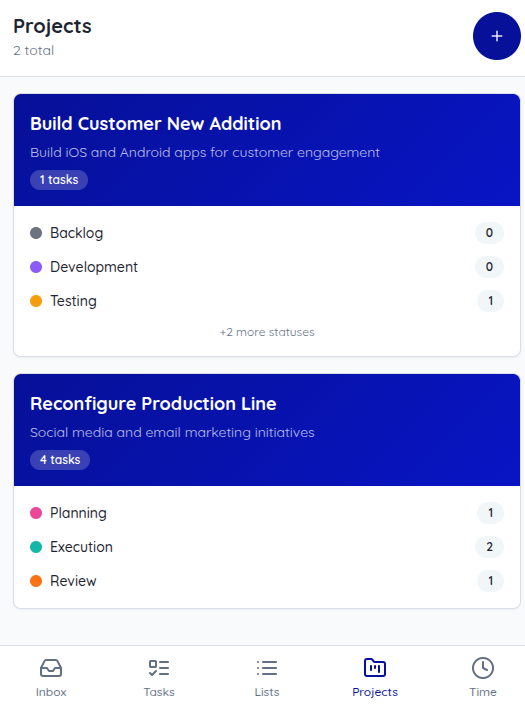
An Online Kanban Board Built for Small Teams
Finitu is a kanban board app for teams that want to see work without a heavy project tool. Each project gets an online kanban board with your own stages, and each card sits in the column for its status with its priority showing, so anyone can open the board and see what's in progress.
Kanban for small teams works best when it stays simple: drag a task to the next stage when it moves, keep the board as the one place work is tracked, and skip the status meeting.
Key Benefits
Customizable Lanes
Create lanes that match your workflow: To Do, In Progress, Review, Done—or whatever works for you.
Team Collaboration
Assign team members to projects. Everyone sees the same board with real-time updates.
Priority on Every Card
Each card shows its priority, so urgent work stands out on a busy board.
Progress Tracking
See project completion at a glance. Identify bottlenecks and optimize your workflow.
Project Settings
Configure project permissions, default lanes, and notification preferences.
Drag & Drop
Move tasks between lanes with drag-and-drop. Update status instantly.
Frequently Asked Questions
What is a kanban board?
A kanban board shows work as cards in columns, one column for each stage, such as To Do, In Progress, and Done. Moving a card to the next column shows the work moved forward, so anyone can see what is in progress at a glance.
Can I change the columns on my board?
Yes. In project settings you can add lanes for your own workflow stages, set a color for each lane, and reorder lanes to match your process.
How do I update a task on the board?
Drag the card to another lane to update its status, or drag it within a lane to reorder. Click a card to open the task and edit its details.
Can I track time on tasks from the board?
Yes, and it is optional. Every card is a regular Finitu task, so you can run a timer on it, and project reports add up the hours.
Who can see a project board?
The users and groups you assign to the project. Everyone assigned sees the same board.
Ready to Get Started?
Start your 60-day free trial today. No credit card required.